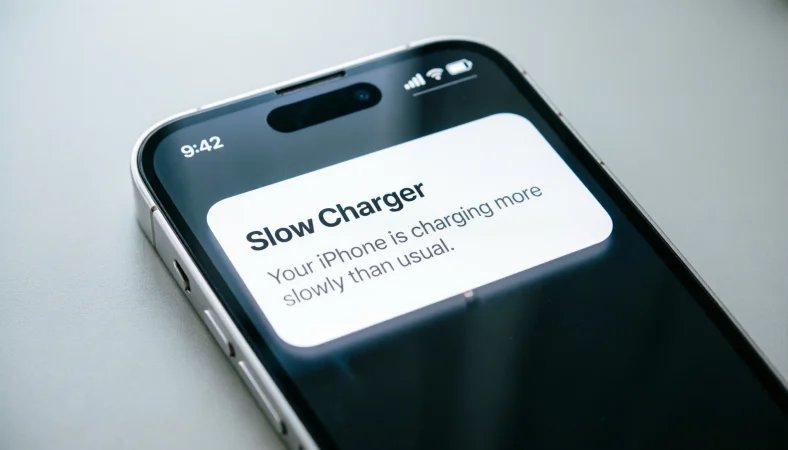
“Slow Charger” on iPhone means your charger is providing less power than needed for normal charging speed, causing the battery to charge more slowly than usual.
You plug your iPhone in before bed, expecting a full charge by morning. But when you wake up, you notice a small notification that reads “Slow Charger.” Confused? You’re not alone.
This message has puzzled iPhone users since Apple introduced it as a feature to help maintain battery health and manage charging expectations. While it might seem alarming at first, the “Slow Charger” notification is actually a helpful indicator that tells you exactly what’s happening with your device’s power intake.
In this comprehensive guide, we’ll unpack everything you need to know about the “Slow Charger” message on iPhone. From what it means to how to fix it, and why it matters for your battery’s long-term health. Whether you’re using a third-party charger, charging from a laptop, or just curious about optimizing your iPhone’s charging habits, this guide covers it all.
Quick Answer Box
| Category | Details |
|---|---|
| Meaning | Your iPhone is receiving less power than it needs for optimal charging |
| Context | Appears when using low-power chargers (under 5W) or poor-quality cables |
| Usage | Displayed in the battery/charging notification area |
| Platforms | All iPhone models (iOS 16 and later) |
| Example | “Your iPhone is charging slowly. Use the included USB-C cable and a compatible power adapter.” |
| Tone | Informational and neutral |
What Does “Slow Charger” Mean on iPhone?
The “Slow Charger” notification is exactly what it sounds like: your iPhone is telling you that it’s charging at a slower rate than it could be. This message appears when the connected power source cannot deliver enough wattage to charge your device at its maximum potential speed.
When you see this notification, your iPhone is essentially saying: “Hey, I’m getting power, but not as much as I’d like. If you want faster charging, you might want to consider using a different charger.”
Why Does This Matter?
Understanding the “Slow Charger” message is important because:
- It sets expectations – You’ll know why your battery percentage isn’t rising as quickly as you’d expect
- It protects battery health – Using appropriate chargers helps maintain long-term battery performance
- It prevents frustration – Rather than wondering why your phone isn’t charging fast enough, you get a clear explanation
- It guides purchasing decisions – Understanding what your iPhone needs helps you choose the right accessories
Full Technical Definition
The “Slow Charger” notification is a system-level alert that appears when your iPhone detects a charging rate below what it can accept. This typically occurs when:
Technical Specifications
- Power threshold: Generally, below 5W (5V/1A) for most iPhones
- Trigger conditions: Connected charger output ≤ 5W
- Detection method: iOS measures the actual power delivered to the battery
- Notification type: System notification (not app-specific)
How the iPhone Detects Slow Charging
The iPhone uses sophisticated power management technology to constantly monitor the amount of electricity flowing into its battery. This includes:
- USB power delivery negotiation – The device communicates with the charger to determine its maximum power output
- Real-time current measurement – The phone measures actual current (in amperes) and voltage (in volts) being delivered
- Charging rate calculation – iOS calculates the overall charging speed based on the power received
When this calculation falls below what the iPhone can handle, the system triggers the “Slow Charger” notification as a way to inform you.
What the Notification Actually Shows
The full message typically reads:
“Slow Charger. Your iPhone is charging slowly. Use the included USB-C cable and a compatible power adapter.”
Or, on some versions:
“This accessory may not be optimized for your iPhone.”
Context & Usage
Understanding when and why the “Slow Charger” notification appears requires looking at the broader context of iPhone charging technology and user behavior.
When Does This Notification Typically Appear?
The “Slow Charger” message typically appears in these scenarios:
1. Using an old 5W USB-A charger
Many users still use the classic 5W cube charger that came with older iPhones. While these work perfectly fine, they charge modern iPhones slower than what the devices can handle.
2. Charging from a laptop or computer USB port
Most computer USB ports (especially USB-A) output only 2.5W to 4.5W, which is significantly less than what your iPhone could accept with a proper wall charger.
3. Using a lower-quality third-party charger
Not all third-party chargers are created equal. Some might not negotiate power delivery effectively, resulting in slower charging.
4. Using a damaged or non-MFi certified cable
Apple’s “Made for iPhone” (MFi) certification ensures cables meet Apple’s standards for power delivery. Non-certified or damaged cables may not carry power effectively.
5. Power bank with low output
Some portable power banks, especially older or smaller ones, output less than 5W, triggering the notification.
6. Charging while using power-hungry apps
If you’re running GPS navigation, playing graphics-intensive games, or streaming high-resolution video while charging, your iPhone might display “Slow Charger” even with a proper charger because the phone is consuming power faster than it’s being replenished.
The Evolution of iPhone Charging Technology
To understand this notification fully, it helps to know where iPhone charging has come from:
| iPhone Model | Original Charger | Max Supported Charging Speed |
|---|---|---|
| iPhone 4-5 | 5W (5V/1A) | 5W |
| iPhone 6-8 | 5W (5V/1A) | 5W (standard) / 12W (fast charge with iPad charger) |
| iPhone X-11 | 5W (5V/1A) | 18W (with USB-C PD charger) |
| iPhone 12-14 | No charger included | 20W (with USB-C PD charger) |
| iPhone 15 Plus | No charger included | 20W (with USB-C PD charger) |
Since 2020, Apple stopped including chargers with new iPhones, making it even more important for users to understand what their devices need.
Why Apple Added This Feature
Apple introduced the “Slow Charger” notification to:
- Educate users about charging technology and what their devices need
- Reduce support tickets from users wondering why their phone isn’t charging faster
- Encourage use of better accessories that provide a superior user experience
- Support battery health awareness as slow charging isn’t harmful, but understanding why it’s happening matters
Real-Life Examples
Let’s explore how the “Slow Charger” notification appears in real-world situations.
Conversation Example 1 – Morning Routine
User: “My iPhone says ‘Slow Charger’ this morning. What does that mean?”
Friend: “It means you’re using a weak charger. Probably the old white cube from your iPhone 6.”
User: “Oh yeah, I grabbed it from my junk drawer. Is it bad for my battery?”
Friend: “Nah, it’s fine. Just takes longer. Plug it into the USB-C charger that came with your new iPad for faster charging.”
Conversation Example 2 – Work Setup
Colleague: “My phone was at 10% when I plugged it into my computer at 10 AM. It’s now 2 PM and it’s only at 53%. Keeps showing ‘Slow Charger’.”
Tech Support: “Computer USB ports are low power. That’s why you’re seeing that message. Better to use your wall charger.”
Colleague: “Good to know. I was worried something was wrong with my phone’s battery.”
Conversation Example 3 – Travel Scenario
Traveler: “I plugged my iPhone into this hotel room USB port and it says ‘Slow Charger’. Will it still charge overnight?”
Friend: “Yeah, but slowly. If you need a full charge fast, use your own wall adapter with a proper USB-C cable.”
Traveler: “I should have packed my own charger. Lesson learned.”
Conversation Example 4 – Power Bank Use
User: “My new power bank is showing ‘Slow Charger’ on my iPhone. Should I return it?”
Friend: “Check the specs. If it’s outputting less than 5W, that’s why. Returns depend on your needs.”
User: “It says output is 5V/1A, so 5W. My iPhone 15 can handle up to 20W. Should I get a faster one?”
Friend: “If speed matters to you, yes. For emergencies, 5W works, it just takes about 3-4 hours for a full charge vs 1-1.5 hours.”
Conversation Example 5 – Gaming While Charging
Gamer: “I was playing Genshin Impact on my iPhone with it plugged into my fast charger. It still said ‘Slow Charger’?”
Friend: “Because you’re using more power than it can take in. The game is draining it. Pause gaming and it’ll charge faster.”
Gamer: “That makes sense. The charger can’t keep up with the game’s power demands.”
Platform-Specific Meaning
iOS Notification Center
The “Slow Charger” message appears in your iPhone’s Notification Center, typically when you first connect the charger. It may also appear in the “Battery” section of Settings.
Lock Screen
When your iPhone is locked and charging slowly, you might see the message displayed on the lock screen directly below the battery percentage indicator.
Battery Settings
Go to Settings → Battery → Battery Health & Charging to check if your iPhone has been charging slowly. The system may show a “Charging Optimization” message here as well.
iMessage / SMS
The “Slow Charger” notification is device-specific and doesn’t appear in messages or communications. However, users might discuss it in messages (as shown in our examples above).
Apple Watch
Apple Watch has a similar notification when using non-optimized chargers, though it uses different terminology.
iPad
iPad users may also see a “Slow Charger” notification when using low-power adapters, though iPads typically need more power (10-12W minimum).
Alternative Meanings
While “Slow Charger” primarily refers to charging speed on iPhone, it can have other meanings depending on context.
In Tech Communities
Among tech enthusiasts, “slow charger” often refers to any charger that doesn’t support Power Delivery (PD) fast charging.
In Charging Standards Terminology
- Standard charging: 5W or less
- Fast charging: 12W and above (varies by device)
- Super-fast charging: 20W+ with USB-C PD
Misinterpretation as “Broken Charger”
Some users mistake “Slow Charger” for “Charger is broken.” Important distinction: The charger is working, just not at peak efficiency. Unless you see “This accessory may not be supported” or similar, your charger is functional.
In Android Context
While Android devices also show charging speed indicators, they typically use terms like “Charging slowly” or “Fast charging” rather than a specific notification.
Technical Alternative Definition
In electrical engineering terms, a “slow charger” might refer to chargers that intentionally limit current to preserve battery longevity, though this isn’t Apple’s implementation.
Related Terms & NLP Variations
Synonyms and Related Phrases
| Term | Meaning |
|---|---|
| Slow charging | General term for reduced charging speed |
| Charging slowly | Same meaning, different phrasing |
| Low-power charging | Charging at reduced wattage |
| Standard charging | Not fast charging |
| 5W charging | Charging at 5 watts specifically |
| USB-A charging | Using older USB-A standard that delivers less power |
Semantic Relationships
- Slow Charger ↔ Fast Charger – Opposite concepts
- Slow Charger ↔ USB-C – USB-C typically enables faster charging
- Slow Charger ↔ Power Delivery – PD standard enables fast charging
- Slow Charger ↔ iPhone battery health – Impact on long-term battery longevity
Frequently Asked Derivations
- “Why is my iPhone charging slowly?”
- “How to fix slow charging on iPhone”
- “Is slow charging bad for iPhone battery?”
- “What is a slow charger on iPhone”
- “iPhone showing slow charger message”
Platform-Specific Terminology
- Apple official: “Slow Charger” notification
- Tech media: “Charging slowly” or “Slow charging issue”
- User forums: “Slow charging message” or “Why is my phone charging slow”
How to Respond / Reply
Immediate Actions When You See This Notification
1. Don’t panic
The notification is informational, not a warning. Your iPhone isn’t damaged; it’s just charging at a reduced speed.
2. Check your charging setup
Identify what charger and cable you’re using. Are they from Apple? Are they MFi certified? Are they in good condition?
3. Try a different outlet or USB port
Sometimes the issue is with the power source, not the charger itself.
4. Switch to a higher-wattage charger if speed matters
If you need fast charging, switch to:
- iPhone 12-14: USB-C charger (20W recommended)
- iPhone 15 series: USB-C charger (20W recommended)
- Older iPhones: 12W iPad charger or compatible PD charger
5. Consider your usage while charging
If you’re using power-intensive apps, pause them to allow faster charging.
Long-Term Solutions
Invest in the right charger:
- USB-C Power Delivery charger (20W-30W for most users)
- MFi-certified USB-C to Lightning cable (or USB-C to USB-C for iPhone 15)
- Quality power bank with at least 18W output
Replace old equipment:
- Retire the old 5W cube chargers
- Replace frayed or damaged cables
- Check for corrosion on cable connectors
Use Apple’s recommended accessories:
While third-party chargers can work, Apple’s official chargers (or MFi-certified alternatives) ensure optimal performance.
When to Be Concerned
If you consistently see “Slow Charger” even with:
- Apple’s official 20W charger
- A good-quality MFi-certified USB-C cable
- Clean charging port
Then you might need to:
- Clean your iPhone’s charging port carefully with a wooden toothpick (not metal)
- Restart your iPhone
- Check for iOS updates
- Visit an Apple Store if the problem persists
Misinterpretations
Common Misunderstandings
Misinterpretation 1: “My charger is broken”
Reality: “Slow Charger” means your charger is working but delivering lower power. A broken charger would show “This accessory is not supported” or simply not charge at all.
Misinterpretation 2: “My battery is damaged”
Reality: “Slow Charger” is about the power source, not the battery health. Your battery could be perfectly fine but still display this message with a low-power charger.
Misinterpretation 3: “This is a warning about safety”
Reality: It’s not a safety warning. It’s informational. No need to unplug the charger immediately.
Misinterpretation 4: “Only Apple chargers work”
Reality: Many high-quality third-party chargers work perfectly well. Look for MFi certification and appropriate wattage.
Misinterpretation 5: “Fast charging always damages batteries”
Reality: Modern iPhones manage power intelligently. Fast charging may generate more heat, but Apple’s thermal management prevents damage.
Fact vs Fiction
| Fiction | Fact |
|---|---|
| “Slow Charger means my phone is going to break” | It just means your phone is charging at lower speed. No damage occurs. |
| “I can only use Apple chargers” | Quality MFi-certified chargers from reputable brands work perfectly. |
| “All USB ports provide the same power” | USB-A ports often provide 2.5-4.5W; USB-C ports can provide 20W or more. |
| “Fast charging ruins iPhones” | Modern iPhones are engineered to handle fast charging safely. |
What the Notification Doesn’t Mean
- Your iPhone is defective
- Your battery is failing
- Your phone is in danger
- You need to buy a new charger immediately
- You’re doing something wrong
When NOT to Use It
Scenarios Where “Slow Charger” Is Not Appropriate
1. In formal technical documentation
Use “lower-power charging” or “reduced charging rate” instead.
2. When referring to Android devices
Android devices use different terminology. Use “charging slowly” in a platform-neutral context.
3. For non-Apple devices
The “Slow Charger” phrase is Apple-specific. For other devices, use generic terms.
4. In professional battery health discussions
Be more precise: “Charging at 5W or below” rather than the casual “slow charger.”
5. For educational content about batteries
Use proper terminology: “low-wattage charging” or “reduced power delivery.”
Better Alternatives in Different Contexts
| Context | Better Terminology |
|---|---|
| Technical documentation | “Charging at reduced power levels (≤5W)” |
| Android or cross-platform | “Your device is charging slowly” |
| General battery health | “Low-wattage charging” |
| User guide | “Your iPhone is not receiving enough power for optimal charging” |
Usage Tips
Maximizing iPhone Charging Efficiency
For optimal charging speed:
- Use a 20W USB-C charger (or higher)
- Use an MFi-certified cable
- Charge in cool environments (heat slows charging)
- Remove your case if your phone overheats
- Airplane mode reduces background power usage
- Close unnecessary apps while charging
For battery health preservation:
- Don’t obsess over charging speed – slow charging is actually easier on battery chemistry
- Use Optimized Battery Charging (Settings → Battery → Charging)
- Don’t let your battery drop to 0% regularly
- Charge to 80-90% for daily use (90% is fine, 100% is fine too)
The Best Chargers for iPhone
| iPhone Model | Recommended Charger | Charging Time |
|---|---|---|
| iPhone 8 to X | 12W (USB-A) | ~2.5 hours full charge |
| iPhone XR to 11 | 18-20W (USB-C PD) | ~1.5 hours |
| iPhone 12 to 14 | 20W (USB-C PD) | ~1 hour (0-50% in 30 mins) |
| iPhone 15 series | 20W (USB-C PD) | ~1 hour (0-50% in 30 mins) |
What to Look For When Buying a Charger
- Wattage: Minimum 20W for newer iPhones
- Certification: Look for MFi certification
- Quality brands: Anker, Belkin, Spigen, Apple
- USB-C power delivery: Supports fast charging standards
- Safety features: Overheat protection, short circuit protection
- Reviews: Check user experiences before buying
Travel Tips
- Pack a fast charger for when you need speed
- Keep a slow charger for overnight charging (gentle on battery)
- Carry a quality power bank (at least 18W output)
- Charge in airports/cafes with high-quality USB-C ports if possible
FAQs
1. What does “Slow Charger” mean on iPhone?
It means your iPhone is getting less power than recommended, so charging takes longer.
2. Is a slow charger bad for iPhone?
No, it’s safe and can even be gentler on battery health.
3. How do I fix the “Slow Charger” message?
Use a higher-wattage charger (20W recommended) and a certified charging cable.
4. Can I still use a slow charger?
Yes, your iPhone will charge normally, just at a slower speed.
5. Why does my old charger show “Slow Charger” on a new iPhone?
Older chargers often provide less power than newer iPhones can support.
6. Does slow charging harm battery health?
No, slow charging usually creates less heat and is easier on the battery.
7. What charger is best for iPhone?
A 20W or higher Apple-compatible charger is best for faster charging.
Conclusion
The “Slow Charger” message on iPhone simply means your device is charging at a lower speed than normal. It is not a warning of damage or a faulty charger. Your iPhone will still charge safely, but it may take longer to reach full battery.
In many cases, slow charging can even be better for battery health because it produces less heat. If you want faster charging, using a 20W or higher charger with a certified cable is the best option.
Read More Articles About:
- What Does a Safety Pin Tattoo Mean? Symbolism, History & Personal Meaning In 2026
- Tapping the Helmet in Baseball: Meaning, Rules and Examples In 2026